The Picasa desktop client has been released in version 3 with some changes, and Picasa Web Albums also saw a revamp with new features. For instance, there's now an Explore tag which lets you visually discover new pics by others.

An interesting new feature is Picasa's face recognition. Google acquired image recognition company Neven Vision a while ago, and now Picasa got some of that technology, too*. Get started by logging in to Picasa Web Albums and clicking the "Try it" button below the Name Tags headline to the right. This will trigger a job with a progress bar, and you can check back a while later. (At first, none of my test photos seemed to yield matches, but today I'm getting some results.)
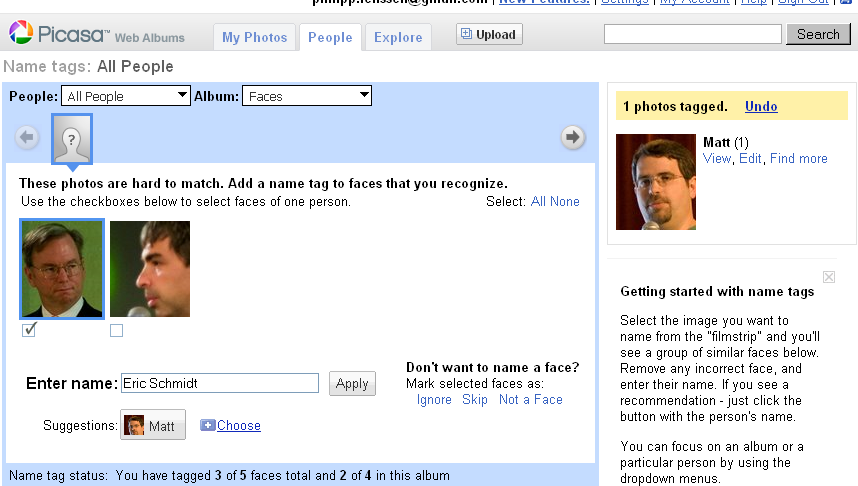
Once faces are found, you can switch to the People tab and tag them with names. In my test photos I tagged Matt Cutts, Sergey Brin and others. I then uploaded more photos containing these persons. Google did not automatically tag them; what they do is find the rectangle within the photo containing a face, and then offer suggestions (sometimes correct, sometimes incorrect), so you'll end up semi-manually identifying the remaining faces. All in all a useful feature as this lets you group and find your photos by the persons in them, but it would become even more useful if Google were able to automatically assign matches.

Another addition to Picasa Web Albums is a game called "Where in the World?". Here your job is to try to guess where a given snapshot was taken by clicking on a world map. You'll then see the distance to the actual location and get more points the closer your pick. The game looks neat but it would probably be more fun if they'd more often show you pictures for which there's a realistic chance to know the location (e.g. a picture of a famous monument versus a picture of a more general shore scenery). I wonder if Google has any intentions to get back some data for their AI to mine here, but considering the game already knows the location of each given picture, I'm not so sure.
[Thanks Hebbet!]
*Since some time, Google image results can also be restricted to show just faces.
[By Philipp Lenssen | Origin: Picasa Web Albums Adds Face Recognition, Map ... | Comments]

